There is a version of this story that plays out more often than it should.
A company's Tableau Server has been humming along for years without issue. Then something changes — an SSL certificate expires, an OS patch is applied, a staff member turns over — and suddenly the server is down. The team calls Tableau support. Support pulls up the version number and says, essentially: You are too far out of date, and your version is no longer supported.
That is not a hypothetical. It is what happens when people mistake "if it ain't broke, don't fix it" for an infrastructure strategy.
The good news is that this outcome is entirely preventable — it just requires putting a plan in place.
The Pegboard Problem
"Wait," you might say. "Why should we mess with things that are working just fine?"
Because no connected system operates in isolation, and most people are only in control of a subset of the infrastructure, not all of it. There's an illustration we use to drive this point home.
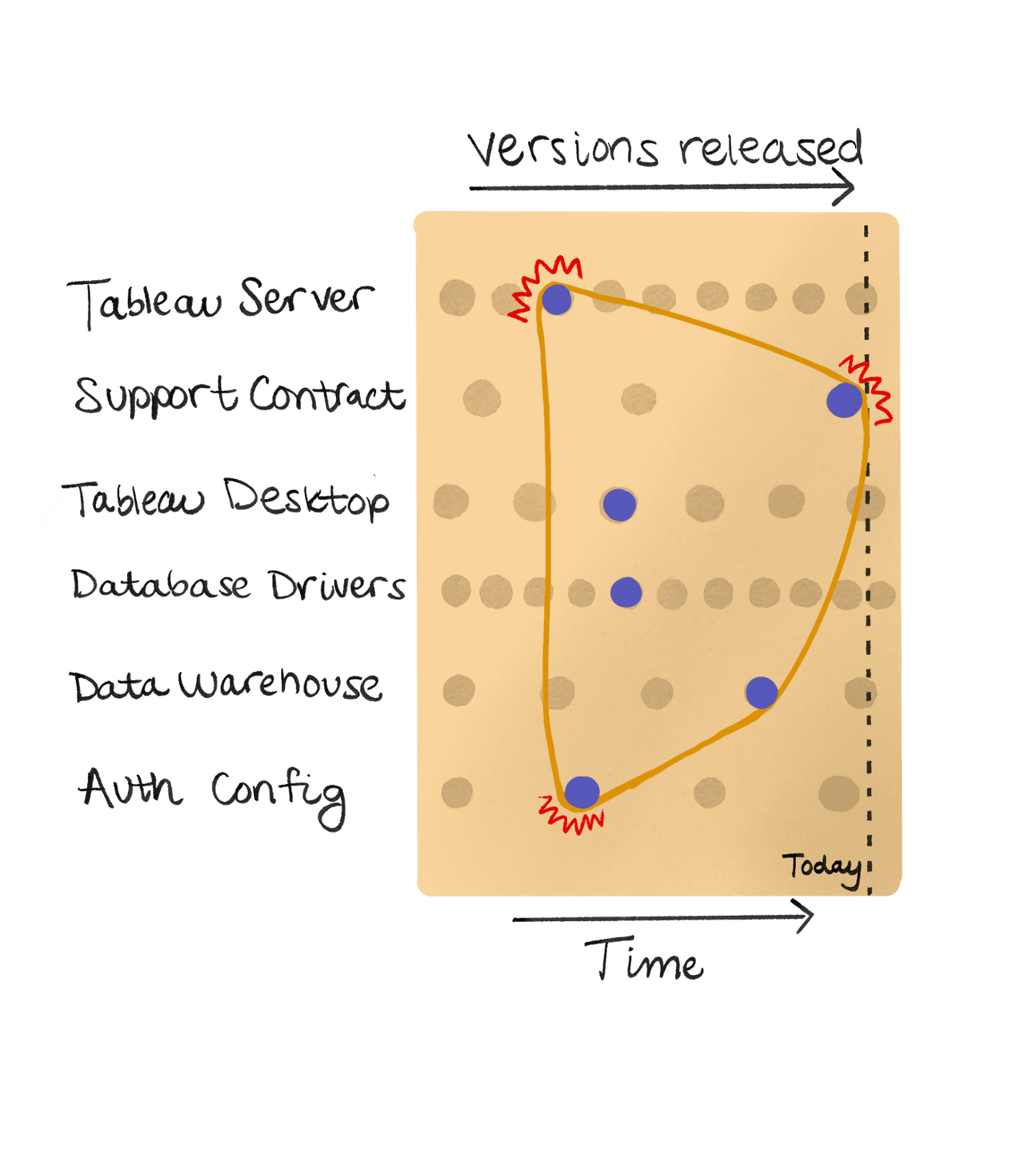
Imagine, if you will, all the different pieces of your analytics infrastructure as pegs on a pegboard. Every individual aspect of your infrastructure — Tableau Server, the Tableau Support contract, the hardware it's running on, Tableau Desktop, database drivers, the data warehouse itself, authentication configuration (I'm looking at you, Snowflake) — these are the individual rows of holes on the pegboard.
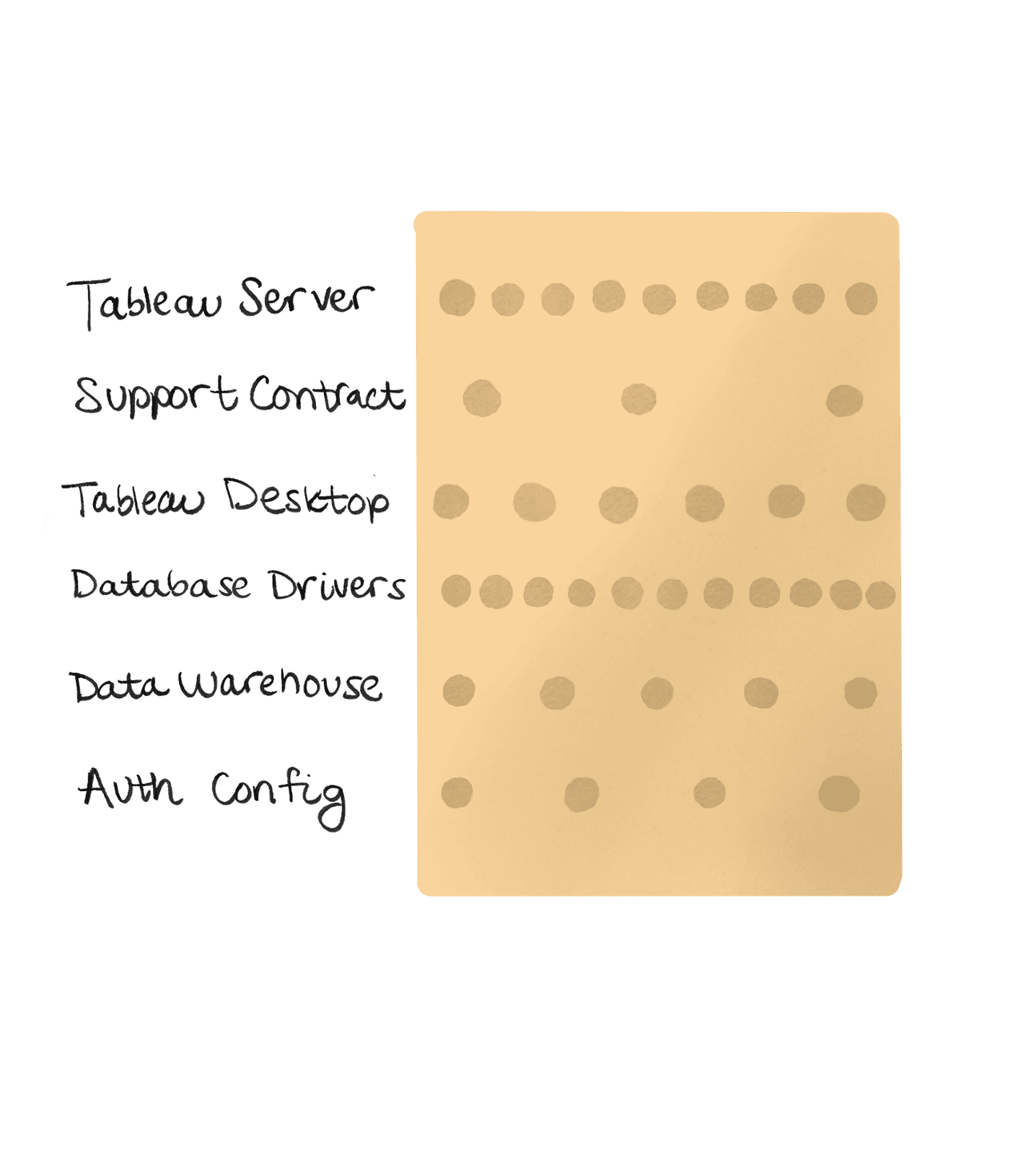
The versions of those components are the columns—and versions tend to increase over time, so you can also imagine the columns as "when was this version released." Some components iterate slowly (like Tableau Server's supported version) and some iterate quickly (like Tableau Server itself), which shows up as peg holes being closer together on some rows and farther apart on others.
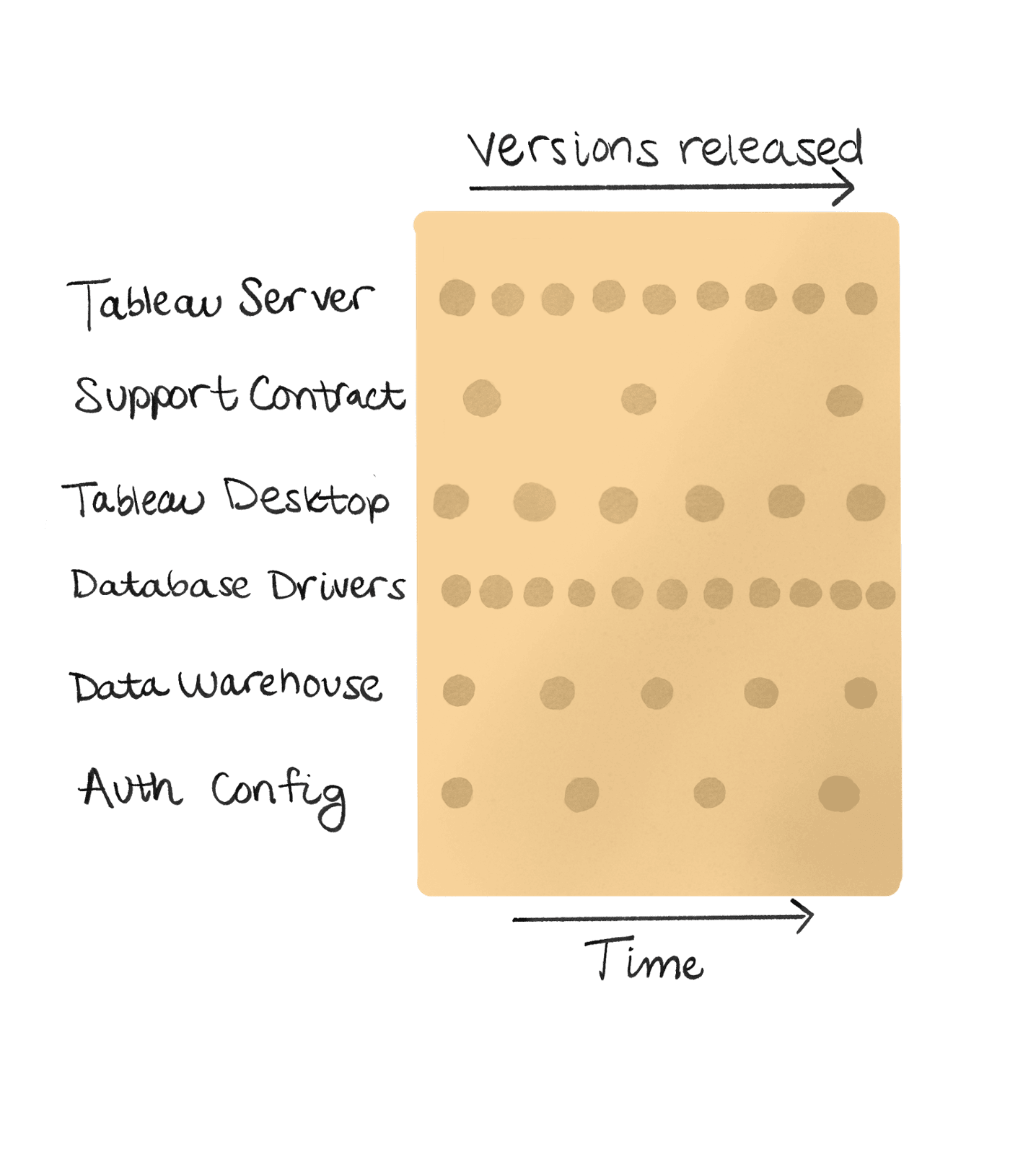
The pegs themselves are placed in the holes for which versions are relevant for each component. Remember, you probably only control some of these pegs.
Now, imagine rubber bands looping around the pegs that need to work together.
If the versions of the components are compatible, those pegs are closer together, and the rubber band can fit around all the pegs without snapping. It might be totally slack, with room to give as things change. Or it might have a little bit of tension, but nothing the rubber band couldn't handle. As long as the tension in the rubber band isn't too much to handle, everything works.
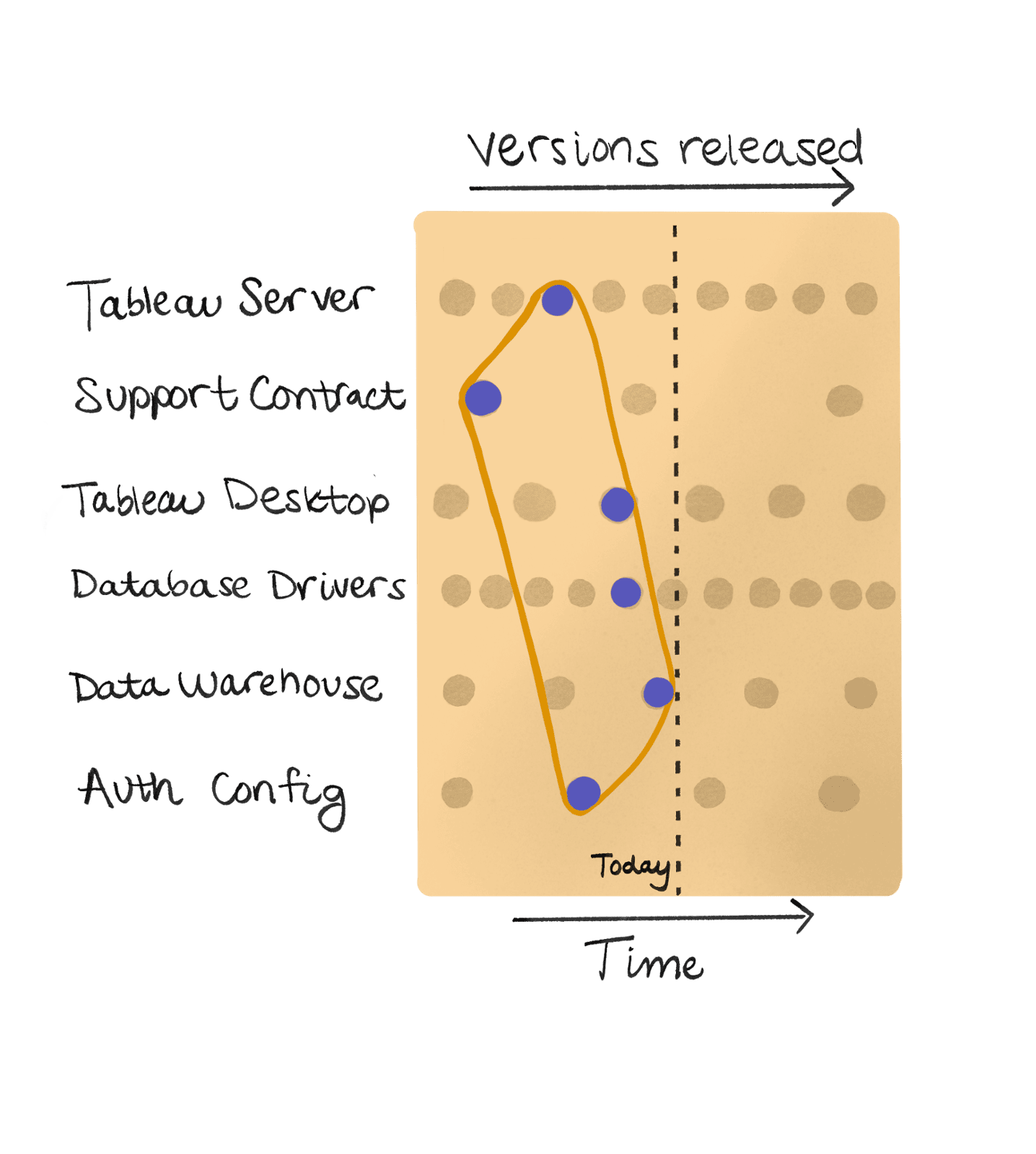
But when one of those pegs drifts too far — especially the ones that aren't in your control — the rubber band stretches and, eventually, snaps. And if you've ever been hit by a rubber band when it snaps… it doesn't feel good.
That is the situation organizations find themselves in when deferred maintenance finally catches up: a down server, no vendor support, and a team scrambling to reconstruct years of configuration decisions from memory.
Scope and Size: A Better Way to Think About Updates
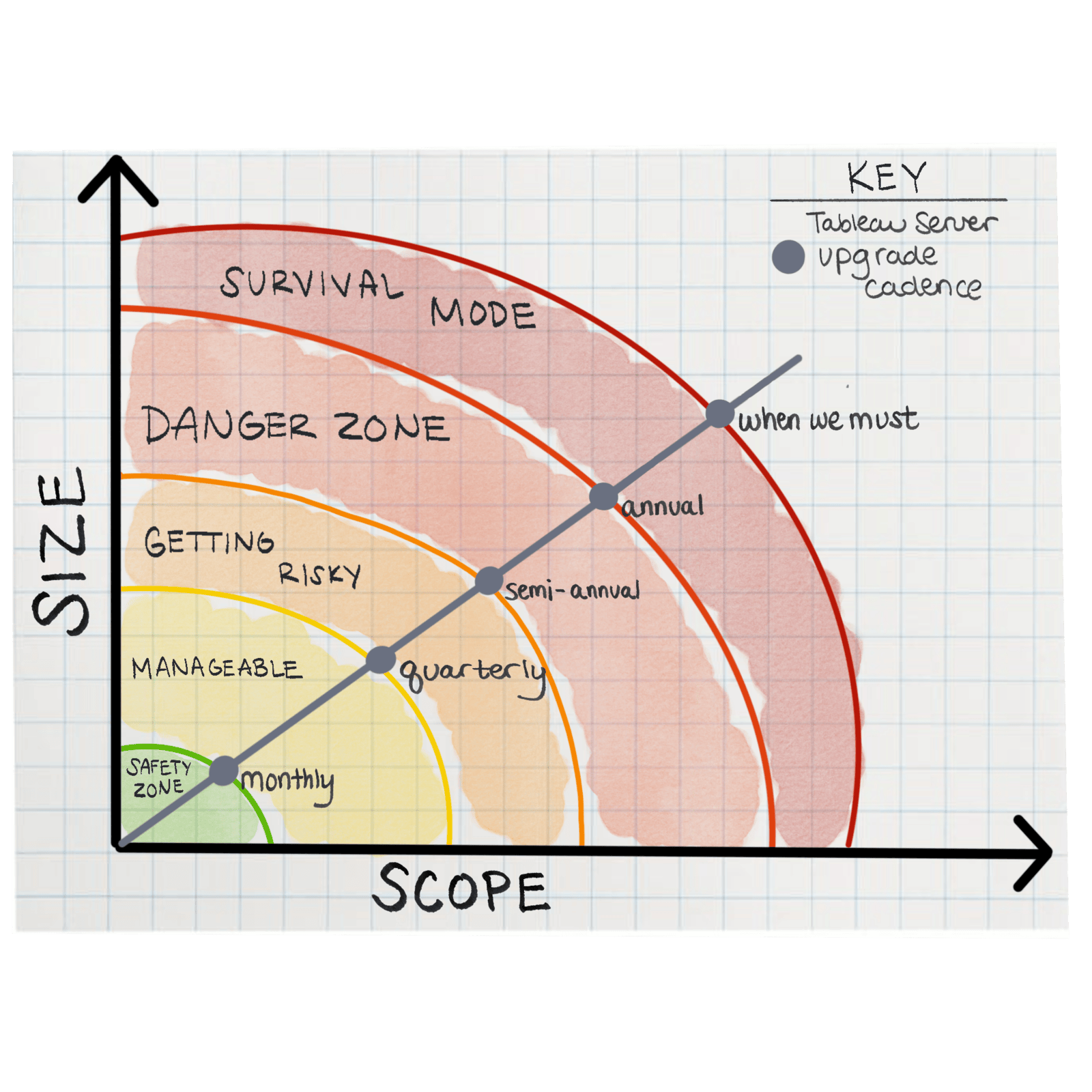
Not all updates are created equal. Two factors determine how much work any given update actually requires:
Scope describes the types of things that change from your current version to the target version.
- A patch release typically carries only bug fixes — small changes, narrow impact.
- A minor release introduces new features, and may require a bit more: it may contain several bug fixes you need to communicate to your stakeholders, but it also contains new functionality to assess and potentially implement. Users love new features!
- A major release with backwards-incompatible changes may require an adjustment to your infrastructure's architecture, or configuration reviews — and as a result, it probably requires more planning and preparation than the other two scopes.
Size describes how many of those changes accumulate before you act.
- If you update monthly, a given release might carry a few bug fixes and one small feature.
- If you update yearly, you're handling 12 months of patches, features, potential regressions, and breaking changes.
Together, scope and size reflect the amount of work required to perform the maintenance, as well as the potential amount of risk that work carries. A sustainable maintenance strategy keeps both as small as possible.
What Deferred Maintenance Actually Costs
When you defer updates long enough, something beyond technical debt accumulates: organizational debt. The team member who understood the original configuration moves on. Documentation grows stale. And when something eventually breaks — because something always eventually breaks — no one knows where to start.
Consider the practical math. A customer running a 2021 version of Tableau Server who needed to reach a current 2025 release was technically dealing with one upgrade. But that upgrade contained four years of accumulated changes:
- dozens of individual patch releases rolled into one,
- over 200 new or updated features,
- more than 20 features deprecated,
- all in all, roughly 315 items to consider (excluding bug fixes).
That is a fundamentally different undertaking than a routine maintenance window.
How Often Should You Update?
The answer depends on your risk tolerance, your team's capacity, and how critical Tableau is to your organization — but the options break down clearly.
- Monthly is the lowest-risk posture.
- Each release carries the least accumulated change.
- Scope is narrow, size is minimal, and updates become routine enough that they stop feeling like events.
- If something does go wrong, the workarounds are inconvenient, but not show-stopping.
- This is the option that makes Tableau Server maintenance boring — and boring maintenance is exactly what you want.
- Quarterly is manageable.
- Contains a larger update window and will contain a few months of patches.
- You will typically stay within the same major version, avoiding the impact of several backwards-incompatible changes at once.
- You may have more workarounds to manage, depending on the scope and size of the changes between versions.
- Semi-annually is better than nothing.
- If you're not changing major versions during one maintenance window, you will be during the next one.
- The scope expands accordingly: what was a recurring maintenance task starts to look more like a recurring project.
- Ad hoc or annual updates lead to more work, at best.
- These often require project planning, stakeholder communication, thorough testing cycles, and meaningful downtime risk.
- The gap between versions is no longer a maintenance consideration — it is the project itself.
- If you approach these tasks as if they are routine maintenance instead of projects, you may only learn about the risks after they've materialized. By then, you've committed to dealing with the impacts, even though they can't be quantified until everything is back to normal.
Making Updates Part of the Routine
The organizations that handle Tableau Server best are not necessarily the ones with the most sophisticated environments.
They have a maintenance schedule. They stick to it. And if something goes wrong, it doesn't take a ton of effort to remediate, because the size and scope of the maintenance was appropriately constrained.
Need Help Getting Current?
If your Tableau Server is behind on updates — or if you are not sure where it stands — High Performance Technologies can help you assess the gap and build a path forward. Whether that means a one-time upgrade to get you current, or an ongoing managed services arrangement to keep you there, we can scope what makes sense for your environment.
Learn more at highperformance.tech/services or reach out directly at highperformance.tech/contact-us.